



for·te /fôrt, fôr-tā/ nounsomething a person does especially well; a strong point.
Put the best-fit ticket in front of the right rep.
Forte is a Zendesk Marketplace app. It learns where each support representative is strongest from your team's own ticket history. It runs inside Zendesk, and your data stays yours.
- $25 per support representative per month
- 21-day free trial
- Any Zendesk Support or Suite plan
Forte enables your team to leverage their strong points.
Who is best at which tickets usually lives in a manager's head, and it changes as people learn. Forte keeps that picture current from your own ticket history.
- Fewer handoffsThe ticket goes to someone who has handled that kind of work.
- Fewer reopened ticketsThe support representative who knows the work tends to keep it solved.
- Lower support costs, higher CSATFewer handoffs and reopens tend to lead there.
Approve your areas. Then support representatives take the next ticket.
Forte reads your ticket history
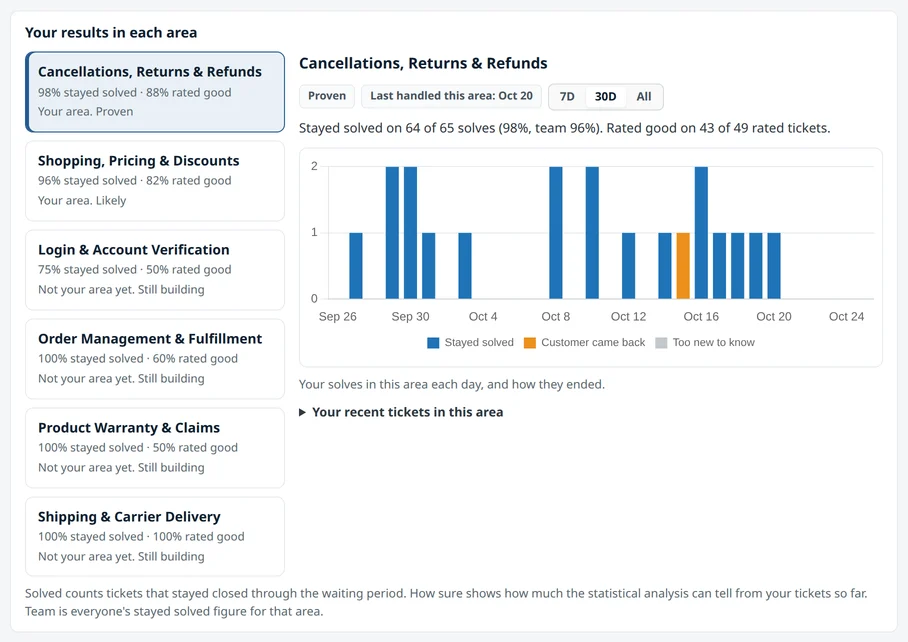
Each result is labeled Proven, Likely, Unproven or "not enough data".
You approve the areas
An area is a kind of work, like Refunds. An admin reviews every change before launch.
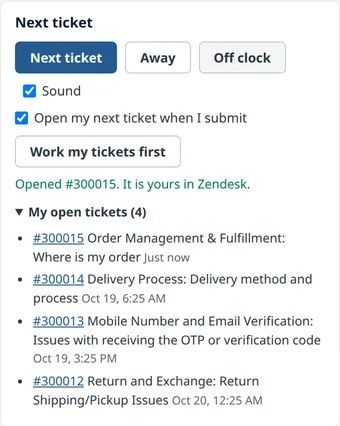
Support representatives take the next ticket
After each submit, or from the Forte icon on any Zendesk page.

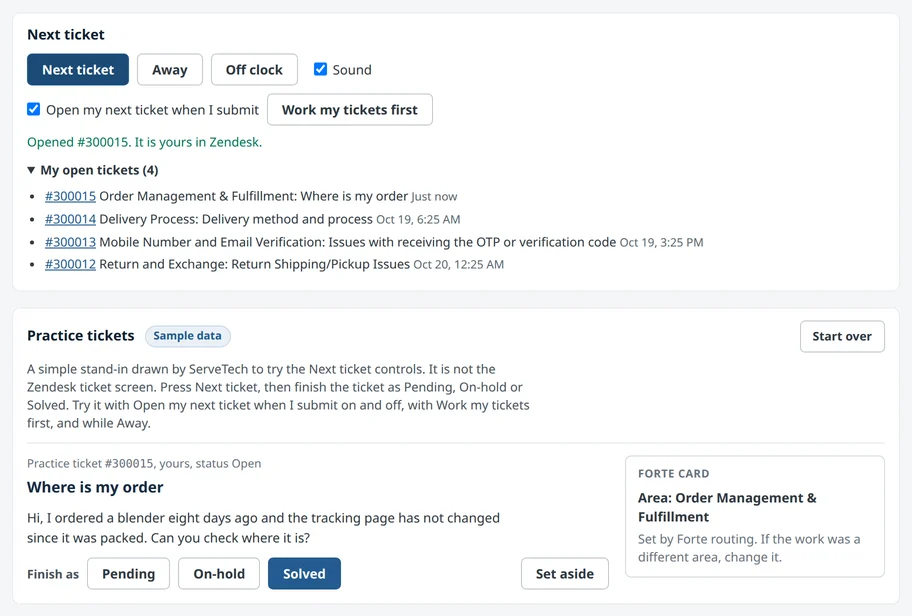
The best-fit waiting ticket, one click away.
It goes to someone who has handled that kind of work, not just whoever is free. Support representatives can finish their own open tickets first.
See where each support representative is strongest, and how sure each result is.
Managers see every support representative in every area. Each support representative sees only their own results.

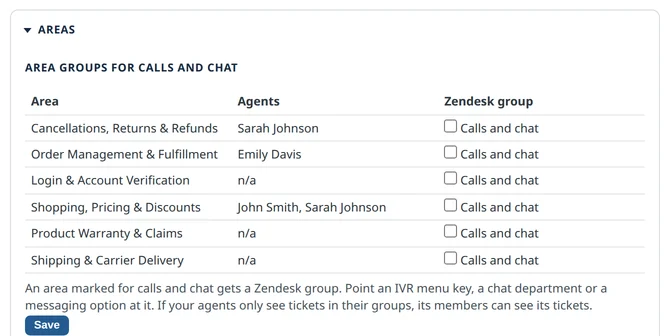
Areas that reach calls and chat.
Each area marked for calls and chat becomes a Zendesk group, like "Refunds (Forte)". Forte assigns the next ticket by rule for email, web form and API tickets. For calls and chat, Zendesk does the routing. Forte keeps the groups it uses current.
Turn strengths into a starting point.
Each support representative's own view shows their strengths by area, a good start for a talk about what they know and what they want to learn next. The Impact report compares your team before and after Forte.
Your data stays yours.
Forte runs inside Zendesk, in your browser. The only remote file it loads is Zendesk's own app framework script.
- Your Zendesk
- Tickets, support representatives and groups. Forte reads and writes through Zendesk's app framework.
- Your browser
- Where Forte runs.
- ServeTech
- Stays out of it. Forte has no server of its own.
One plan. Every feature. A 21-day free trial.
Forte
$25 per support representative per month
21-day free trial. Zendesk handles billing.
- The right next ticket for each support representative
- Areas from your own ticket history
- Area groups for calls and chat
- The manager view of the whole team
- Each support representative sees their own strengths
- Staffing and the Coverage Calendar
- Coaching, one-on-ones and shout-outs
- The Impact report, Trends, Highlights and export
- Result settings tuned to your team

Every team has experts in their industry topics, but who they are usually lives in a manager's head. Forte helps you find them.
Jeff Allred
Founder, ServeTech LLC, Provo, Utah
Requirements
- Any current Zendesk Support or Suite plan.
- Zendesk's automatic assignment turned off for email, web form and API tickets.
- Forte open in an admin or manager account during the workday. Area groups need an admin's copy open.
- IVR menus need a Zendesk Talk plan that includes IVR.
Common questions
Does Forte route calls and chats?
No. Forte assigns the next ticket by rule for email, web form and API tickets. For calls and chat, Zendesk does the routing. Forte keeps the groups it uses current.
Do support representatives see each other's results?
No. Each person sees only their own results.
What happens when the trial ends?
Zendesk starts billing at $25 per support representative per month unless you cancel in Admin Center before the trial ends. The Terms of Service, section 3 covers what happens when the trial ends.